응답 규칙
변경 사항에 대해 확실하지 않다면 주의해서 진행하세요. 잘못된 수정은 시스템을 중단시킬 수 있습니다.
응답 규칙(SRR)은 백엔드가 수신 구독 요청에 대해 평가하는 순서 있는(위에서 아래로; 규칙이 적용되면 평가가 중지됨) JSON 규칙 세트입니다.
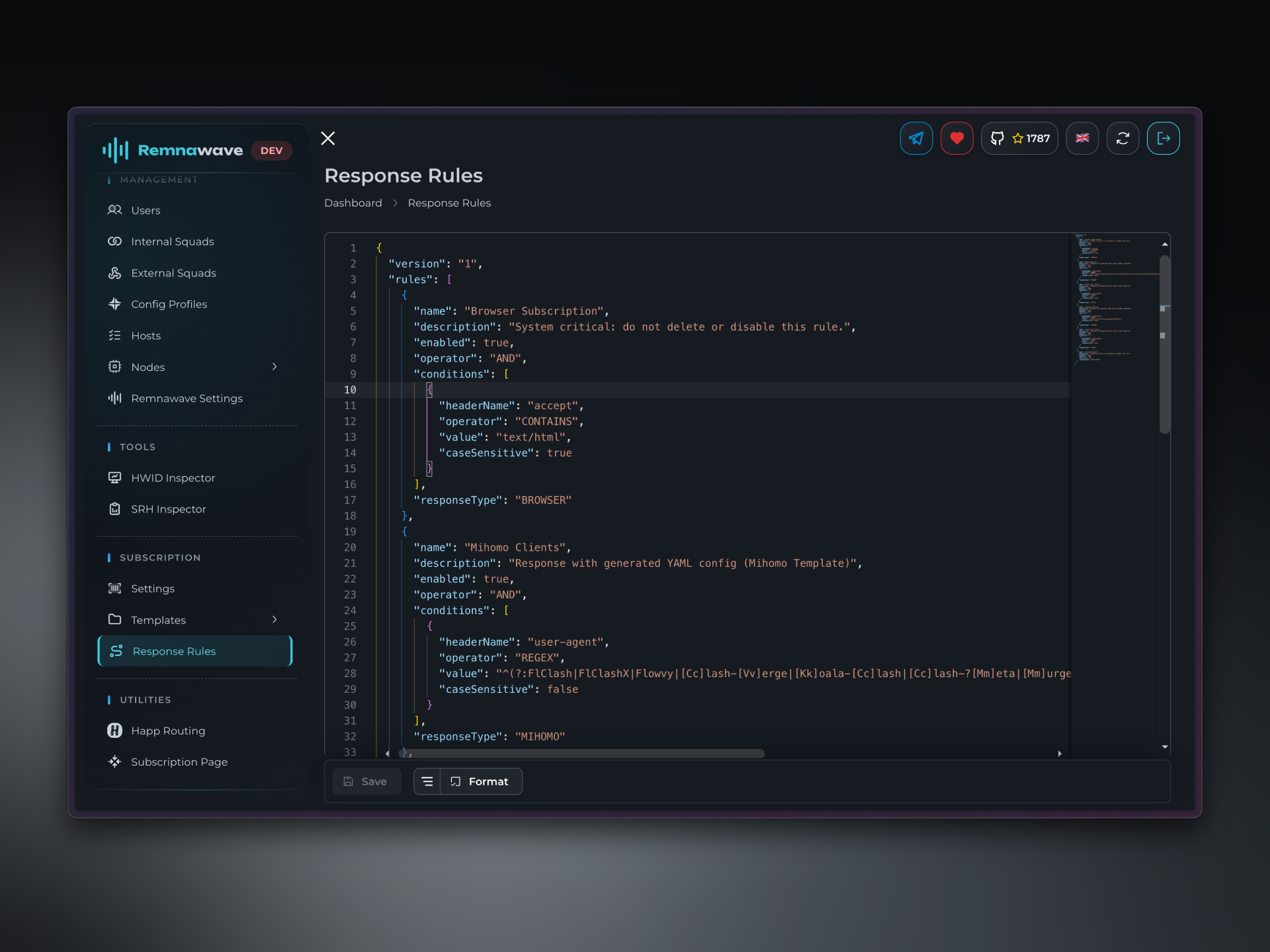
응답 규칙은 외부 스쿼드 설정을 재정의합니다.
사용자 지정 응답 규칙 만들기
Happ 클라이언트 앱을 사용하는 Android 사용자에게 사용자 지정 템플릿과 사용자 지정 헤더를 제공하는 사용자 지정 응답 규칙을 만들어 보겠습니다.
다음과 같이 동작해야 합니다:
- 사용자가 구독을 요청합니다
- Remnawave가 Android에서 Happ을 사용하고 있음을 인식합니다.
- Remnawave가 사용자 지정
Happ Android템플릿으로 응답하고 사용자 지정 헤더HappTheBestAppOnTheWorld를 추가합니다.
규칙은 다음과 같을 수 있습니다:
{
  "name": "Happ Android",
  "description": "Serve custom JSON for Android",
  "enabled": true,
  "operator": "AND",          // Both "user-agent" and "x-device-os" must be matched
  "conditions": [
    {
      "caseSensitive": false,
      "headerName": "user-agent",
      "operator": "CONTAINS",
      "value": "happ"
    },
    {
      "caseSensitive": false,
      "headerName": "x-device-os",
      "operator": "EQUALS",
      "value": "android"
    }
  ],
  "responseType": "XRAY_JSON",
  "responseModifications": {
    "subscriptionTemplate": "Happ Android",   // Serve the custom Template
    "headers": [                              // Serve the custom headers
    {
      "key": "x-provider-id",
      "value": "HappTheBestAppOnTheWorld"
    }
    ]
  }
}
rules
각 규칙은 다음 필드를 가진 객체입니다:
-
name(string) — 필수; 1..50자"name": "Block Legacy Clients" -
description(string) — 선택적; 최대 250자"description": "Blocks requests from legacy clients" -
enabled(boolean) — 필수
규칙이 활성화되어 있는지 제어합니다.false이면 평가 중에 규칙을 건너뜁니다."enabled": true -
operator(enum) — 필수;AND또는OR"operator": "AND" // Rule matches only if ALL conditions match
"operator": "OR" // Rule matches if ANY condition matches -
conditions(array)
평가할 조건 목록."conditions": [] // Empty = match everything (use for fallback rules) -
responseType(enum) — 필수
규칙이 일치할 때 보낼 응답을 결정합니다:유형 설명 MIHOMOMihomo YAML 설정 CLASHClash YAML 설정 STASHStash YAML 설정 SINGBOXSing-box JSON 설정 XRAY_JSONXray JSON 설정 XRAY_BASE64Base64로 인코딩된 Xray 설정 BROWSER브라우저용 HTML 페이지 BLOCKHTTP 403 Forbidden STATUS_CODE_404HTTP 404 Not Found STATUS_CODE_451HTTP 451 Unavailable For Legal Reasons SOCKET_DROP소켓 연결 끊기 -
responseModifications(array) - 선택적
응답에 적용할 추가 수정 사항. 사용자 지정 템플릿이나 헤더를 제공하는 데 사용할 수 있습니다.subscriptionTemplate(string) - 선택적
규칙이 일치할 경우 제공할 특정 템플릿을 정의합니다.headers(array) - 선택적
사용자 지정 헤더로 응답합니다.key(string) - 선택적
헤더 이름.value(string) - 선택적
헤더 값.
applyHeadersToEnd(boolean) - 선택적
기본적으로 응답을 형성할 때 헤더가 추가됩니다. 경우에 따라 SRR에서 설정된 헤더가 시스템의 다른 부분(예: 외부 스쿼드)의 헤더에 의해 재정의될 수 있습니다. 이 플래그를true로 설정하면 SRR의 헤더가 응답이 전송되기 직전 마지막에 추가됩니다. 이 경우 SRR 헤더가 다른 섹션의 헤더를 재정의할 수 있습니다.ignoreHostXrayJsonTemplate(boolean) - 선택적
각 호스트는 자체 Xray Json 템플릿을 가질 수 있습니다. 이 플래그를true로 설정하면 SRR에서 정의된 Xray Json 템플릿이 사용됩니다. 호스트의 Xray Json 템플릿은 무시됩니다.ignoreServeJsonAtBaseSubscription(boolean) - 선택적
Serve JSON at Base Subscription이 활성화된 경우 Panel이XRAY_JSON을 수락할 수 있는 것으로 인식한 클라이언트 앱에XRAY_BASE64를 제공하고 싶을 수 있습니다.
이 플래그를true로 설정하면Serve JSON at Base Subscription설정이 무시됩니다(false로 설정됨).
"responseType": "SINGBOX",
"responseModifications": {
  "applyHeadersToEnd": true,
  "headers": [
    {
      "key": "X-Custom-Header",
      "value": "CustomValue"
    }
  ],
  "ignoreHostXrayJsonTemplate": true,
  "ignoreServeJsonAtBaseSubscription": true,
  "subscriptionTemplate": "Singbox Legacy"
}
rules.conditions
-
headerName(string) — 필수
확인할 HTTP 헤더. RFC 7230을 준수해야 합니다."headerName": "user-agent" // Client app user-agent -
operator(enum) — 필수
수행할 비교 연산:연산자 설명 EQUALS정확히 일치 NOT_EQUALS정확한 일치의 반대 CONTAINS부분 문자열 존재 NOT_CONTAINS부분 문자열 부재 STARTS_WITH접두사 일치 NOT_STARTS_WITH접두사 없음 ENDS_WITH접미사 일치 NOT_ENDS_WITH접미사 없음 REGEX정규 표현식 NOT_REGEX역 정규식 -
value(string) — 필수; 1..255자
헤더 값과 비교할 값."value": "^sfa|sfi|sfm|sft|karing|singbox|rabbithole" -
caseSensitive(boolean) — 필수"caseSensitive": true // The value is compared as is
"caseSensitive": false // The value is lowercased before comparison
다른 OS에 맞는 다른 템플릿으로 쉽게 응답할 수 있습니다.
아래 예시에서 iOS 사용자는 Happ iOS JSON을 받고, Android 사용자는 Happ Android JSON을 받습니다.
{
  "name": "Happ Android",
  "description": "Serve custom JSON for Android",
  "enabled": true,
  "operator": "AND",
  "conditions": [
    {
      "caseSensitive": false,
      "headerName": "user-agent",
      "operator": "CONTAINS",
      "value": "happ"
    },
    {
      "caseSensitive": false,
      "headerName": "x-device-os",
      "operator": "CONTAINS",
      "value": "android"
    }
  ],
  "responseType": "XRAY_JSON",
  "responseModifications": {
    "subscriptionTemplate": "Happ Android"
  }
},
{
  "name": "Happ iOS",
  "description": "Serve custom JSON for iOS",
  "enabled": true,
  "operator": "AND",
  "conditions": [
    {
      "caseSensitive": false,
      "headerName": "user-agent",
      "operator": "CONTAINS",
      "value": "happ"
    },
    {
      "caseSensitive": false,
      "headerName": "x-device-os",
      "operator": "CONTAINS",
      "value": "ios"
    }
  ],
  "responseType": "XRAY_JSON",
  "responseModifications": {
    "subscriptionTemplate": "Happ iOS"
  }
}
- 헤더 이름은 대소문자를 구분하지 않습니다
"user-agent" === "User-Agent" === "USER-AGENT" - 헤더에 여러 값이 있는 경우 쉼표로 구분된 단일 문자열로 연결됩니다.
- 헤더 값이 없으면 규칙이 건너뜁니다.